Category: Tutorial


Here’s a tutorial on how to order items from Comi-Comi Studio as requested by some of you guys :)

You can use it with my Comi-Comi Registration Tutorial.

If you know what you want (or can’t read Japanese in general), I suggest using their search tool and enter the title of the item you want because it is faster and easier for you.

STEP 1: In this case, we’re looking for Tennenouji’s 18+ BL game, ラッキードッグ1 (Lucky Dog 1)
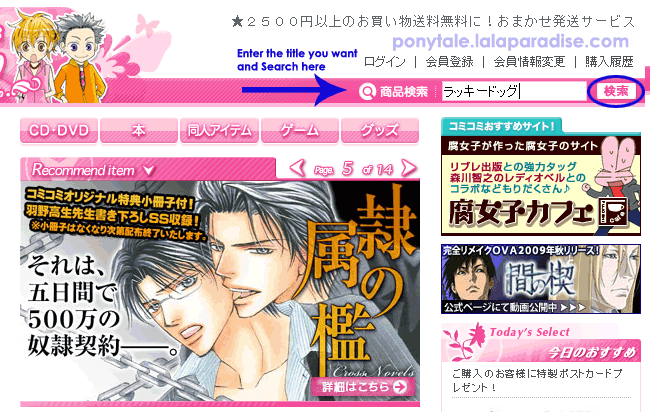
Step 1

******** View full article »

Link To This Page
1. Click inside the codebox
2. Right-Click then Copy
3. Paste the HTML code into your webpage
codebox

I’ve received a couple of requests for a tutorial on how to register an account at Comi-comi studio, a Japanese-only BL shop which ships their BL items internationally by EMS. More info of other shops in my other article: Buying Boys Love Items Online.

Hope this tutorial helps :)

Register account at Comi-comi
To begin, click on the Register link at the website shown in the image (translation in red) to go to the register page. View full article »

Link To This Page
1. Click inside the codebox
2. Right-Click then Copy
3. Paste the HTML code into your webpage
codebox

Updated on 5 February 2009 to reflect HMV Japan points system changes.

The nice thing about shopping at Amazon Japan, HMV Japan and CDJapan, you get points for buying most of the products that are on sale.

CDJapan is in English. For HMV Japan and Amazon Japan, I usually browse and search for items in Japanese as it returns better search results. If you get stuck, just turn on the English language option to view the terms. Amazon Japan offers a points system too but I don’t buy from them as often.

This is a value-per-yen guide to the points systems of Amazon Japan, CDJapan and HMV Japan.

View full article »

Link To This Page
1. Click inside the codebox
2. Right-Click then Copy
3. Paste the HTML code into your webpage
codebox