Here’s a tutorial on how to order items from Comi-Comi Studio as requested by some of you guys :)
You can use it with my Comi-Comi Registration Tutorial.
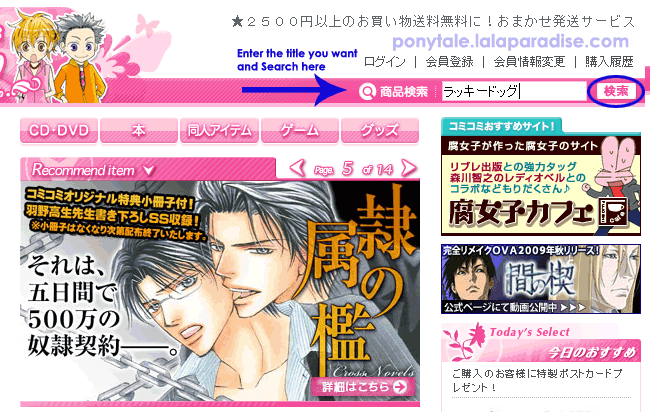
If you know what you want (or can’t read Japanese in general), I suggest using their search tool and enter the title of the item you want because it is faster and easier for you.
STEP 1: In this case, we’re looking for Tennenouji’s 18+ BL game, ラッキードッグ1 (Lucky Dog 1)
********
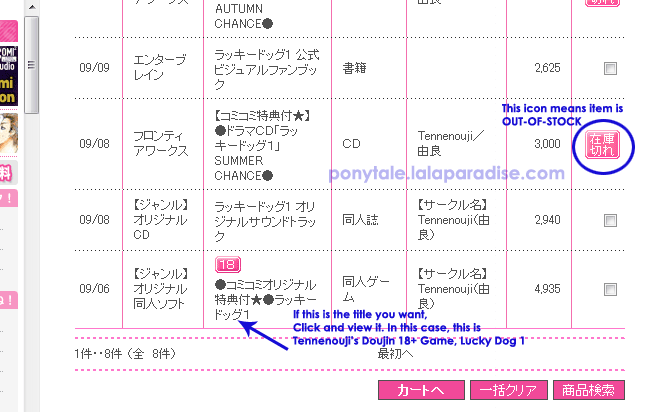
STEP 2: If they have the product, the search results will show up.
********
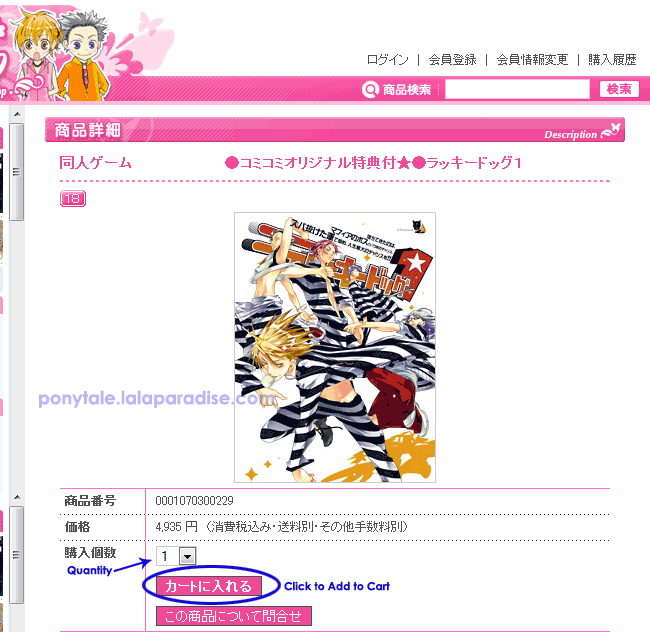
STEP 3: View the item detail page.
********
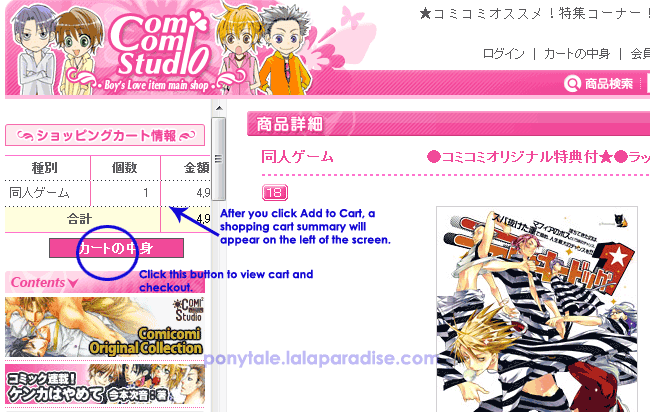
STEP 4: After your click Add to Cart, the item will be added to a shopping cart summary on the left of the screen.
********
STEP 5: This is the shopping cart detail screen.
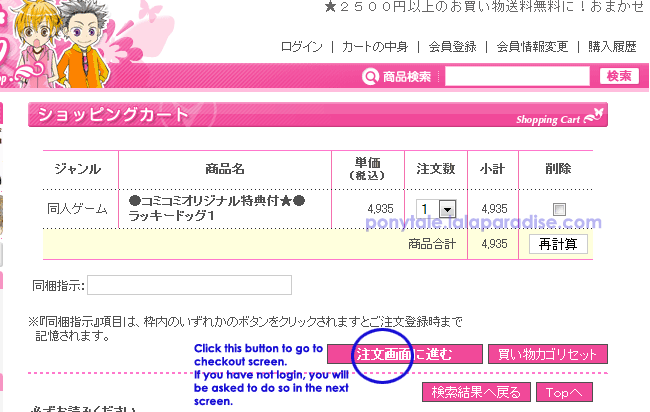
********
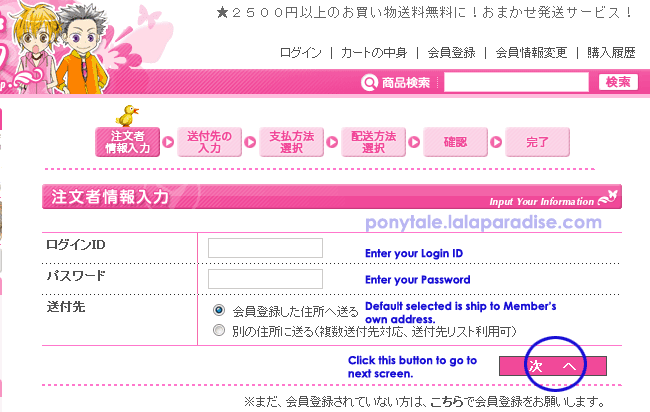
STEP 6: This is the checkout screen.
If you have not registered for an account yet, click here for Registration Tutorial.
There are 5 steps and end at the success page.
(The yellow duck)
Enter user info ~ Customer Info ~ Payment ~ Shipping/Delivery ~ Confirmation ~ Success
********
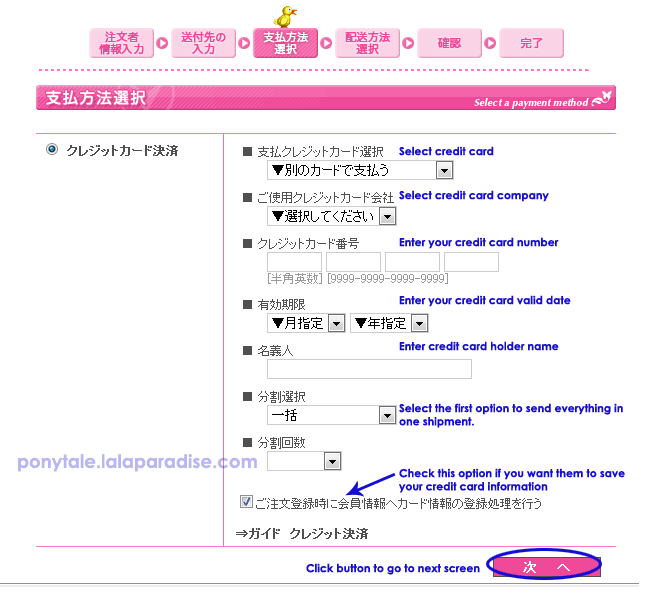
STEP 7: Select Payment screen
********
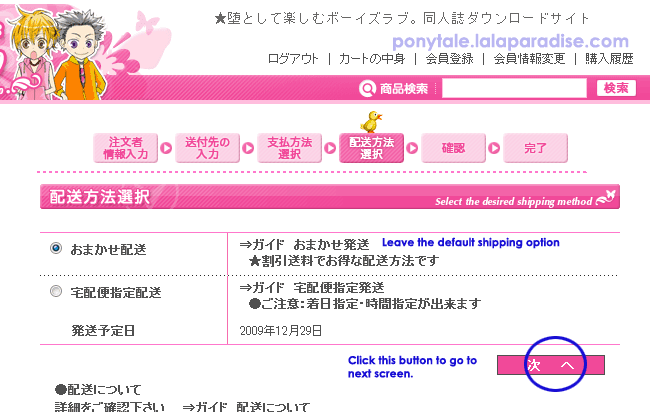
STEP 8: Select Shipping/Delivery Screen
********
STEP 9: Confirmation Screen (FINAL STEP)
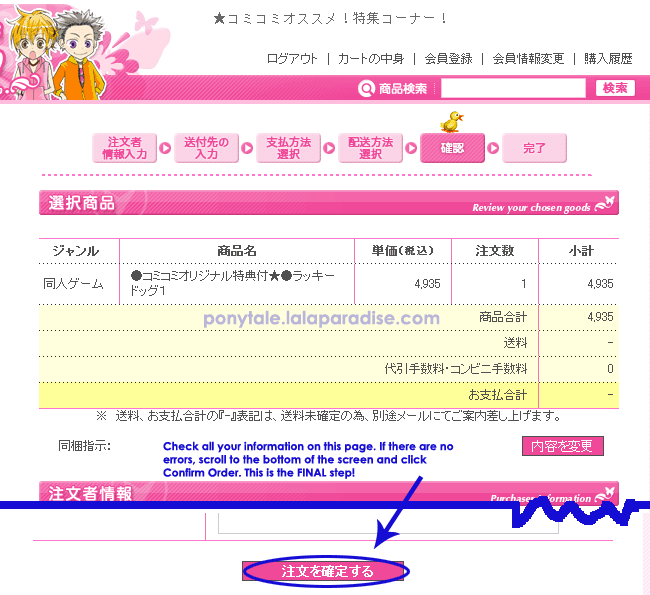
********
If successful, you’ll see an Order SUCCESS screen. You can check your email for the confirmation notification.
Good luck and Happy shopping!
2. Right-Click then Copy
3. Paste the HTML code into your webpage
Hi I don’t know if you even check this anymore since it’s like 8 years after but I need help shopping on the website. I don’t know how to find the things I want. I don’t think I know the Japanese characters for the things I want. Can you email me please? Thanks in advance.
Hi, may i know what is “web signing”.
Hello.I sent them a message about the payment and the sent me the following email.
I don’t quite understand it.Could you help me?
せらぷひん あにあ様
コミコミスタジオをご利用頂きましてありがとうございます。
ご連絡が遅くなりまして申し訳ございません。
受注番号204698729は
ご注文時にご指定のクレジットカードにて
8/20付けで決済させていただきました。
ご利用のクレジットカード会社から
ご利用金額の請求がございますのでご確認ください。
お支払日につきましては、
クレジットカード会社へお問合せください。
ご不明な点がございましたらお気軽にお問合せ下さい。
これからもコミコミスタジオをよろしくお願い致します
@Ania: They apologised for the delay in replying and confirmed that they have successfully charged your credit card on 20 Aug. They asked you to check with your credit card company if you need clarification :)
Hi, may i know if the comicomi point has expiration date.
@zon: The points expire 1 year from the date the order is shipped :)
Ponytale! You’re amazing person ever! I finally understand the website and how they do all the process now, thank you so much. xD Moreover, I love how you always reply to all comments and you’re so kind to us, readers. I really hope your blog will receive best blogger award! hehe
@Ennie: Thanks for your encouragement! I’ll try my best! I didn’t get to do or write as much as I wanted this year. Hopefully all things work out better for me in 2014! Happy new year! :D
Is there any way to edit/change an address that an order is supposed to be sent to after you have made the order? I made an order and then realized I had forgotten my apt. #.
@irimajiri: I think you’ll have to reply to the order confirmation email and ask them for help.
Subject: 住所情報が修正
Message: すみません。
受注番号: YOUR ORDER NUMBER について、送付先情報の住所が間違えたんです。
正しい住所は YOUR ADDRESS です。
住所情報が修正してもらいたいです。
よろしくお願いします。
I am sorry.
Order number: YOUR ORDER NUMBER, I made a mistake in the shipping address information.
Correct address is YOURADDRESS.
I want to correct the address information.
Thanks in advance.
Hope this helps!
Thank you so much for your tutorial, I found it very useful!!! *hugs*
@Gaby: Glad it helped! :D
OMG your guide is amazing and has helped me trough the process a lot, tough I received a mail asking me for my name for overseas shipping (since clearly nobody would understand hiragana/katakana outside of japan), but how do I send them this? because it clearly isn’t from the register form, I would be really thankful if you could tell me this because I don’t want my order to get canceled.
@teelalsh: Glad it helped! Can you paste the email here for me to take a look?
お名前が「ひらがな」のため海外へは送付できません。
折り返し英語表記のお名前をお知らせください。
【9月10日】までにご連絡をお願いいたします。
期限内にご連絡が確認できない場合、
この度のご注文はキャンセルとさせていただきます。
早目のご連絡をお待ちしております。
sorry I pressed post comment by mistake >///
> ※海外へのお荷物の発送の場合、
> 発送準備に数日お時間を頂戴することがございます。
> 発送完了次第、別途ご案内さしあげます。
> しばらくお待ち下さい。
>
> メールの内容につきましてご不明な点がございましたら
> お手数ですが下記アドレスまでお問合わせください。
> ご利用ありがとうございました。
> コミコミ通販部9月のお休み:日曜日・23日
> 〓〓〓〓〓〓〓〓〓〓〓〓〓〓〓〓〓〓〓〓〓
> ★中央書店Webコミコミスタジオ★
> 〒730-0031
> 広島県広島市中区紙屋町2-2-18サンモール4F
> TEL:082-546-1545 FAX:082-249-0124
> http://www.comicomi-studio.com
> sunmall@chuoshoten.co.jp
> 〓〓〓〓〓〓〓〓〓〓〓〓〓〓〓〓〓〓〓
My only previous experience with web stores is from cdjpan and they have a mail for these situations, so I don’t know if I just have to reply to this e-mail, send a new mail or where to send it, which is why I’m asking for your help with this, thanks for taking your time to help me.
@teelaIsh: Thanks for the message. It seems that you copied and pasted 「ひらがな」/”hiragana” in the name field? You should try to contact them before 10 Sept or they will cancel your order.
You can use this website http://www.mauvecloud.net/charsets/kanagenerator.html to generate your English name. Type for example “teelaIsh” to get hiragana てえらいすほ and katagana テーライスホ. It’s not 100% accurate but it is close enough.
After that reply to comi-comi’s email with the following
申し訳ございません。私は ”teelaIsh” です。日本語はたぶん 「テーライス」です。
よろしくおねがいします。
I’m sorry. I am “teelaIsh”. It is probably 「テーライス」 in Japanese.
Thank you.
^^;; sorry for the broken Japanese but I think it should get the message across.
thank you very much, will do! this is more than enough you are awesome.
@teelaIsh: Glad to help. Hope it works out!
I’m sorry for bothering you again >.< but I'm having trouble understanding this mail they send me about the payment to get my order sent to me.
コミコミスタジオをご利用頂きましてありがとうございます。
ご連絡が遅くなりまして申し訳ございませんでした。
お知らせいただきましたカード情報に変更致しまして、
再度決済手続きをとらせていただきます。
ご連絡ありがとうございました。
今回のご注文以外にもカード情報の変更が必要な
ご注文がございましたらご連絡をよろしくお願いいたします。
弊社ではお客様がご利用になっているクレジットカード情報の
詳細を確認することができません。
そのため、ご連絡いただいたご注文以外のカード情報の変更は
行うことができませんので、どうぞご了承くださいませ。
ご不明な点や判り難い点がございましたらお気軽にお問合わせ下さい。
これからもコミコミスタジオをよろしくお願い致します。
This means that I have to change my card information for my next order? or that they need another card to process this order because they were unable to with the one I used? I would be really grateful if you could clear this for me because I honestly can't figure it out.
@teelaIsh: If I’m not wrong, they’ll be processing your payment with the information you gave them. They would like you to contact them if you have other orders that needs to be updated :)
Generally translated as follows:
コミコミスタジオをご利用頂きましてありがとうございます。ご連絡が遅くなりまして申し訳ございませんでした。
Thanks for using our service. Sorry for the late reply.
お知らせいただきましたカード情報に変更致しまして、再度決済手続きをとらせていただきます。ご連絡ありがとうございました。
We changed the card information and did the payment processing. Thanks for contacting us.
今回のご注文以外にもカード情報の変更が必要なご注文がございましたらご連絡をよろしくお願いいたします。
If you have other orders using the new card information, please let us know.
弊社ではお客様がご利用になっているクレジットカード情報の詳細を確認することができません。
We’re unable to find out the details of credit card used by customers.
そのため、ご連絡いただいたご注文以外のカード情報の変更は行うことができませんので、どうぞご了承くださいませ。
Because of this, we won’t be able to make changes unless you contact us.
ご不明な点や判り難い点がございましたらお気軽にお問合わせ下さい。
If you’re not sure, please feel free to contact us.
これからもコミコミスタジオをよろしくお願い致します。
Hope you continue to support us in the future. Thank you!
Thank you for the guides, PonyTale! I’ve never gotten far enough to even make an account before with my beginner’s Japanese.
Anyway, I have a question. I placed an order with a debit card, but they’ve sent an email. The whole email is kind of long, but I think this is the most relevant paragraph (probably).
その結果カード会社から【取扱不可】との連絡があり、
お申し込みの際ご登録頂きましたカード番号情報では
今回はご使用いただけないとの事です。
Using online translators, it seems like they want me to reconfirm the details on my account, then respond to the email? I’m sure I entered in the card info properly, so I’m kind of stumped! Should I just re-enter the info and try again?
@Kenya: I think they have problem accepting your debit card. Do you have another card you can use?
I asked the question about points a while ago.
I read through the information page about points and it said 1 point for 1 yen? Would you have to have accumulated like 500 points to buy one manga volume?
I only have 9 points.
@irimajiri: You can see their chart here on how many % points are given for each type of merchandise. Normal members like us get from 0.2% to 2% on item price depending on what we buy.
http://www.comicomi-studio.com/help/guide/gu_point_04.html
We’re in the grey column: http://www.comicomi-studio.com/help/guide/images/img/img_point_04.gif
To use the points, 1 point equals to 1 yen.
(お買い物時にご利用の際、1ポイント1円でのご利用ができます。)
Each order you can use max up to 10,000 points.
(一回のご注文に使用できるコミコミポイントは10,000ポイントまでとなります。)
You need min 10 points to use it on an order. So that explains why you can’t use your 9 points :)
(注文時にポイントを利用する場合、商品購入時に10ポイント以上の利用可能ポイントを持っていなければ、ポイントを利用することは出来ません。)
http://www.comicomi-studio.com/help/guide/gu_point_02.html
On my past orders it looked like there was only express shipping and it costed almost $15. Is there a cheaper type of shipping? A non-express?
@irimajiri: yeah, For registered mail, the staff has to physically go to the post office, it’s probably why they only offer express shipping for international orders. It’s probably more convenient for them and has tracking and insurance.
Can i combine order?
If yes, how to do that?
@zon: Yes you can! key in the previous order number when you place your new order.
See the official FAQ guide here http://www.comicomi-studio.com/help/guide/gu_bundle_04.html
Image: http://www.comicomi-studio.com/help/guide/images/img/img_bundle_12.gif
How do you use points on comicomi studio? I read Japanese pretty well, and I thought I was going to pay with points I had, but was charged anyway for a certain order. I think I might have done something wrong during the checkout.
@irimajiri How many points do you have? I used my points on an order recently without issues.
I needed to contact Comi Comi Studio regarding an item I purchased but I hear that they don’t offer English customer service. Is there a way to contact them?
@MinzyMinx: you can try using google translate :P What do you want to ask them about? If its within my ability I can help u with the translation.
THanks so much for this PonyTale, so helpful!! ;3;
I was wondering, if you knew whether Comi-Comi accepted Debit cards? I wanna buy DMMd:Re, but only have debit~ TTvTT
Thanks in advance dearie~
@Ipire: I think you can try. One of my friends managed to buy items from comicomi using her debit card too.
Hii thankyou so much for this tutorial, but i would just like to check that the shipping internationally.. is that also to the UK? ;v; because this will be my first time ordering on a site that doenst use paypal so i thought id just double check~ thankyouu <3
@Alex: Yes, they should ship to UK :) If they can’t, they’ll let you know before they process your order.
How much is shipping? What service do they use?
@lucy: they ship EMS only for international orders. The fees will only be added when they ship your order.
they ship internationally right? is shipping free? I mean I just see the total of the item and nothing else
@Kohitsuji: They will only charge you the shipping fee when they ship it. It’s not free, unfortunately :P
Is it easy to cancel an item? Or do I have to mail them?
@Yumii: You’ll have to mail them but so far I have no problems cancelling when required.
Is there a way to display the items’ image in the search results? : D
@plup: Sometimes if the item is on preorder, then most probably the image is not uploaded yet :)
Hi!
I’ve got some pre-orders for May, but right now I want to order an already released Drama CD and have them ship it right away (not wait for it with the other things). Which one of the 3 options under
“分割選択” do I pick? The second or the third one?
Sorry for the bother (^_^)/
@Yumii: If you haven’t sent in the order together, the easiest is to order separately :P 分割選択 in that option means to charge your credit card in installments. If you want them to charge you at one go, choose the 1st option. I’m not sure what the 2nd one means. The 3rd one means charge “separately”.
But if you want to put the orders together, but only want the CD first, I think you can try writing in the message box with my broken Japanese ^^;; anyone knows better please help:
すみません、在庫の「REPLACE WITH THE DRAMA CD NAME」を先に配送ください。ありがとうございます!
I’m sorry, please send the in-stock “REPLACE WITH THE DRAMA CD NAME” first. Thank you!
Hope this helps :P
Thank you Ponytale for the information, you helped me a lot!
Ouch, that must have hurt, receiving Nessa two months late >.<
I remember about this, oh right, you received it so much later than the rest of us, yikes XD
But yeah, it's always a good thing to save on shipping.
My BL magazine was just shipped, I got a confirmation mail from comi!
The delay in processing & shipping was about 4-5 days since the release date, which is reasonable ;)
So they'll ship all my drama CDs when all the pre-order items are released, I'm ok with that because it's only one CD that is for February release. And I want to save on shipping too, I hate paying extra money for shipping XD
I also chose the "leave it to your discretion" shipping option, so I guess they'll charge me the first instalment when all the CDs are released in March =)
I think it's very nice of them to allow credit card payments with instalments, as you said, anything to help the fujoshi on her buying sprees XD So far I also haven't come across another Japanese shop of this kind that allows payments in instalments like comicomi does. And I totally agree, Japanese stores have awesome customer service, comicomi is becoming one of my favourite stores too ;)
Thanks again for your help sweetie, see u~
@Xenia: Glad to help dear! You should be able to receive your magazine this week if it’s sent by EMS. Yeah saving on shipping means we can use that money saved to buy more stuff :D The credit card installment is a good option to have and best thing about Comicomi is that they sometimes have exclusives like signed papers, postcards and special cds ^^ definitely one of my fav BL stores. :D
Hehe, glad to be back sweetie, thanks ^_^
I was worried for nothing, phew, that’s what the delay is all about?
They have to calculate the shipping as well, and then charge the whole amount, I see…
It sure takes a long time though.
Do you know what happens with pre-orders?
I placed a pre-order for 5 drama CDs that will be released in late February and March…
Most of the CDs will be released in March.
When will they charge the payment for these to my credit card?
The status of my pre-order is also “pending payment”, so should I expect them to charge my credit card from now/soon? Also, will they ship all my items together when everything is released?
I chose the default shipping option, but I did something stupid I realized later on…
During checkout, where you select a payment method, there is an option to split payments, and I selected split payment in two, misinterpreting that option for split shipment….So that’s another pain, I have no idea what to expect.
Thanks a lot for your help, hopefully my questions will help other interested buyers as well.
P.S. Their service is awesome, I have sent them, like, 3-4 e-mails by now, to ask them to change permanently my shipping address to English, change credit card, ask for availability of tokutens, and they are always responding the next day ^^ That’s very reliable…and haha, I have become an expert in writing semi-formal e-mails in Japanese XD
@Xenia: :D well, as for the delay… If you put all preorders together, then they’ll only ship when the last preorder is released. I once ordered my Nessa no Rakuen BL game with Yasashiku Toge ga aru BLCD together since their release dates were very close, hoping to save shipping but the BLCD was delayed for about 2 months, so I received my game 2 months later after the BLCD came in OTL;; But I’m cheapo (wanna save shipping) that’s why I didn’t write in to ask them to send separately.
They’ll usually charge both shipping and cost of the order only when they ship. So they’ll probably charge at 2 occasions if the shipment is split into 2. According to them, they’ll try to process the order within three days after the product release date but sometimes they do take longer. I always choose the “I leave it to your discretion” shipping option which is the first one ^^;; The second option allows you to choose the date and time and uses express shipping. The delay you’re experiencing maybe due to the March items. I’ve not split payment before so I’m not sure. They’re probably the only online store selling BL items I’ve ever seen that allow installments (up to 24 months!) Anything to help the fujoshi on her buying sprees lol~ XDD
Maybe you can try writing in and get them to ship the Feb items first :3 and in the future, try to separate the pre-orders if you want to get them sooner.
Yes, they’re one of my favourite online stores because of their customer service too! Japanese stores are really the best when it comes to good service XD
Hi Ponytale, how have you been? I have been pretty busy until now, I’m finally taking a break now^^ could you tell me what the “waiting/pending payment” status I’m seeing in my comicomi orders history means? You just give them your credit card and they deduct the money themselves, right? Do I need to do something like send the payment myself? No, right? Because, my order status for both the CDs I pre-ordered and the just released magazine I ordered has been “waiting payment” for quite a few days now, and I was wondering if I’m doing something wrong, or if there’s something I should be doing ^^; How does it work, exactly? You give them your credit card, and they should be deducting from that credit card the amount of the item cost themselves, right? And then they charge you for the shipping cost, or do they charge you for the entire amount including shipping once? They totally confused me @_@
@Xenia: Glad you’re back, dearie! Don’t worry, waiting/pending payment status means they’re processing your order, so you don’t have to do anything else now :) If there’s something wrong with your credit card, they’ll contact you via email. I’ve got it once because my credit card expired by the time the preorder was available :P They sent me an email to ask me to update my details and processed it again after I did it. I also emailed them after that to make sure they know I already updated it.
They’ll charge the total amount together (shipping cost + cost of ordered items) :)
@ponytale Oh I get it, now I’ll be able to buy HiroC-related stuff lol
thanks for helping ^^
@ziggys: Glad it helps! ^_^)/
Hi Ponytale! thanks for making these tutorials they’re very helpful
but I just got one question, it seems that they don’t indicate how much the shipping cost is? or is it already included in the price of the item?
if you could answer I’d love you <3
@ziggys: Glad they helped! :D
Comi comi only add the shipping cost afterwards and they only ship by EMS. So be aware that shipping heavy items such as thick monthly comics will be quite a killer. I would recommend using them for DVD/CD and games cos the shipping is pretty ok if the items are light.
Thank You !!! :3
@Renee801neko: Glad to help :)
Hi,
Thanks for the information! ^^ Gonna do some shopping then~ XD
Glad to help ^^ happy shopping!
:0
Do they ship internationally?
Hi Jes, yep they do. Only EMS shipping tho :)
can I use posb debit card for payment?
I’m not sure, just give it a try! Good luck! ^^)b